Java Basics and OOPS basics
NEED OF LOOP
Loops is the set of instructions which runs multiple times based on the given conditions.
Based on the Condition there are 3 types of looping methods:
for loop
while loop
do while loop
FOR LOOP
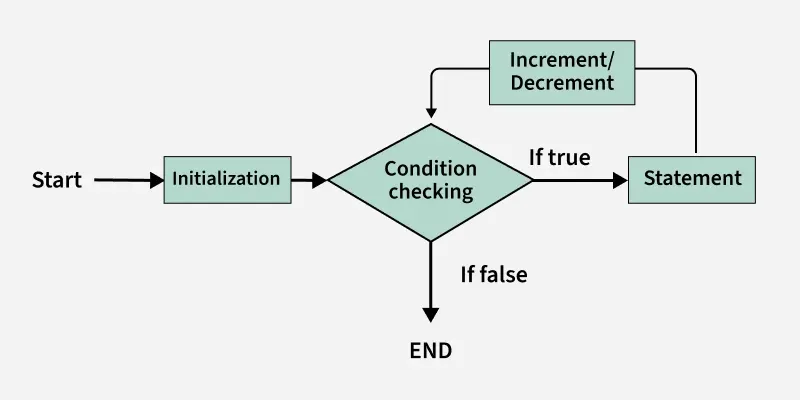
The for loop is used to iterate over a condition(number/characters/etc.) of times we want to iterate.
In the For loop statement we mainly includes three things that are the initialization of the value, conditions like uptill what condition the value should be iterated, whether we want to increment or decrement based on the initialized value.
In initializing condition , we initialize the variable in use and mark the value to start the loop.
When the condition becomes false , the loop terminates marking the end of its life cycle.
//for(initializing;condition;increment/decrement)
 //       statement

for(int i=0;i<5;i++)
        System.out.println("Thanks");

//shortcut i.e. enhanced for loop
//This loop is used to iterate over arrays or collections. ex. studs is a list of students
for(int s: studs)
        System.out.println("Welcome");
WHILE LOOP
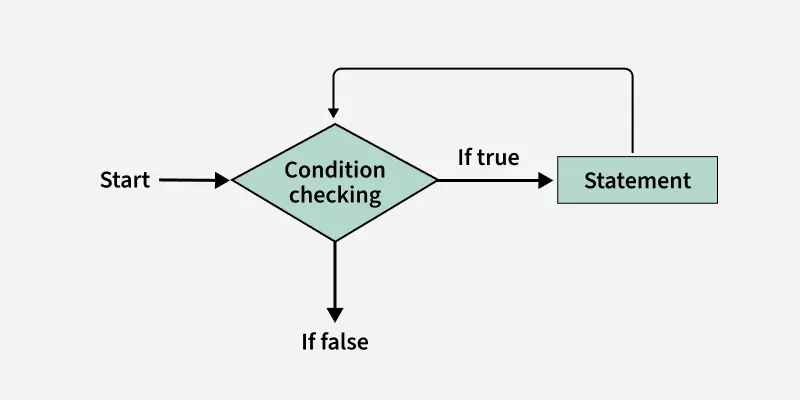
while loop is used to repeat certain block of code over an iteration.
The while loop firstly checks whether the given condition is True then executes.
The while loop works in such a way that it it firstly starts with the boolean condition whether the given condition is true or not . When the condition becomes true then the loop starts and at every point it checks whether the condition becomes false or not. When the condition becomes false the loop stops.
while(condition)
        statement

int i=0;
while(i<10)
        System.out.println("Hey");
        i++;
DO WHILE LOOP
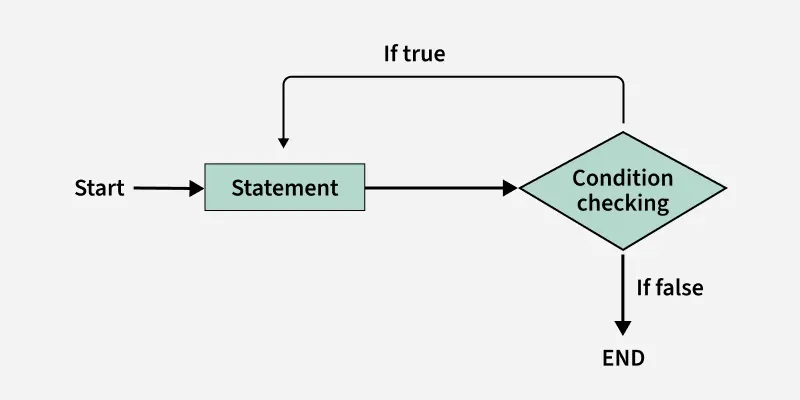
The do-while loop ensures that the code block executes at least once before checking the condition.
In the do while loop there is no checking of any condition for the first time.
It is important that do while loop will execute its statements atleast once before any condition is checked, and therefore is an example of exit control loop.
do{
} while(condition);

int i = 0;
do {
      System.out.print(i + " ");
      i++;
} while (i <= 10);
CLASS AND OBJECTS
CLASS
Class is the blueprint of individual objects are created.
The class contains different different methods, attributes and arguments.
In java, a program can have more than one class.
In java, every class is compiled separately.
OBJECT
Object is an instance of a class.
Objects are something that holds the property of the class.
It is basic unit of Object-Oriented programming that represents real-world entities.
Syntax:

class A{
    //statements
}

public class Main{
    public static void main(String args[]){
        A object_name= new A();
        // Object is created
    }
}
For Example :
import java.util.*;
class Cars{
    String Brand_name;
    int model_year;
    String model_name;
    int price;

    void show(){
        System.out.println("I am purchasing"+Brand_name+"Car "+model_name+"onroad price of"+price);
    }
}

public class staticexample {
    public static void main(String args[]){
        Cars c1= new Cars();
        c1.Brand_name="Mercedes-benz";
        c1.model_name="M4";
        c1.model_year=2024;
        c1.price=100000;

        Cars c2= new Cars();
        c2.Brand_name="BMW";
        c2.model_name="M4";
        c2.model_year=2025;
        c2.price=250000;

        c1.model_name="Racer M4";
        c1.show();
        c2.show();
METHODS
Methods are basically a block of codes that is used to perform a specific tasks in a class or in a function.
This is used to increase the reusability of code and work our code more efficiently.
Return type is defined or not defined based on the given condition in java.
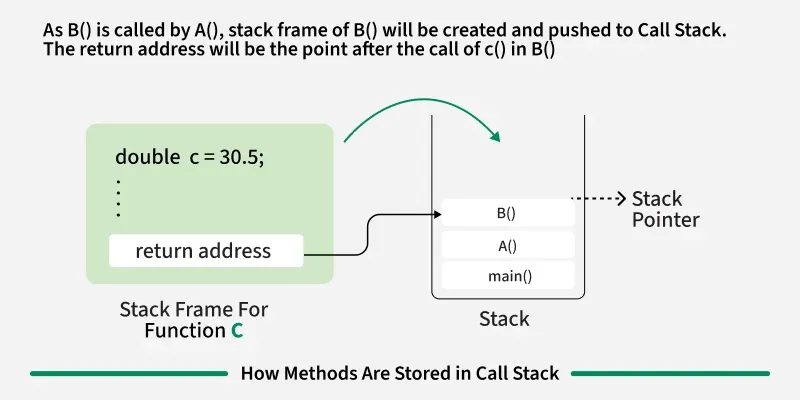
A good programmer in java mainly works on the methods to maintain his code properly and organize the task loads as methods are stored in the stack memory of JVM as when a method calling takes place the new stack memory is created for every call.
After the execution of the stack frame is removed, and control goes back to the calling method.
Syntax:

class Mathematics{
    int num=22;
    public int numberreturn(){
        System.out.println(num);
    }

}
QUESTION:
WHEN TO USE THE RETURN TYPE IN THE METHODS AND WHEN TO NOT??
So it starts with with what datatypes and what keywords are you using to define the method in your code.
If you are using the public void display() , so here were are using void keyword which will not require any return type value.
If your method contains public int display() so here you need to define the return type as a mathematical value like 1,0,-1,etc.
In case you define the return type as a String value in ““ then it will throw return type error.
Sometimes might get confusing why to use the negative return type , lets make it easy…
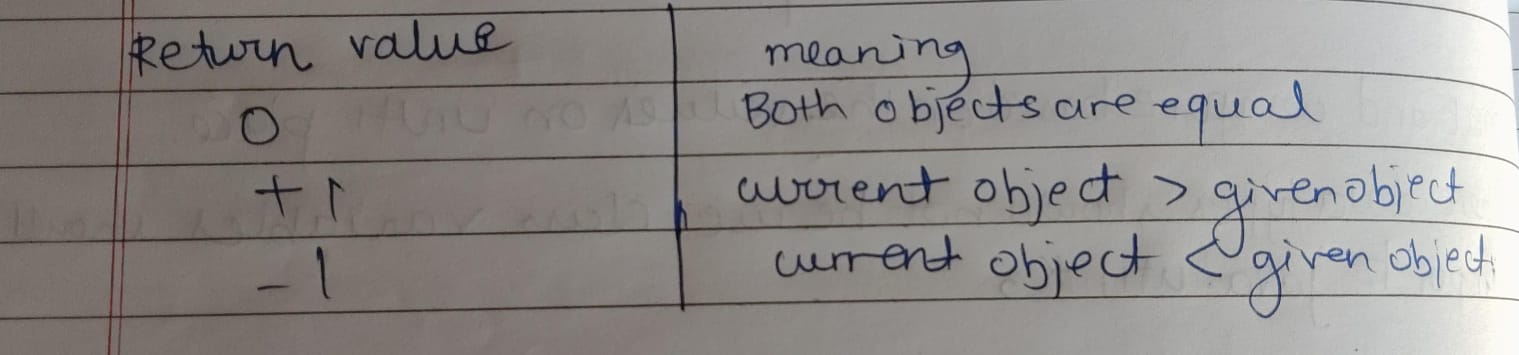
In upcoming session we will come across more types of methods in java like static methods, abstract methods, etc.
METHOD OVERLOADING
Method Overloading means having multiple methods with the same name but different different parameters lists in a class.
It allows you to define more than one method with the same name but different number of parameters, types or both.
It is a type of compile-time polymorphism.
So also we can overload a method based on the number of parameters.
Also we can overload a method based based on the changing data types of the parameters.
Based on the changing the order of parameters we can overload a method.
class Add{
    public int display(int num1,int num2)
    {
         return num1+num2;
    }
    public int display(int num1,int num2,int num3)
    {
        return num1+num2+num3;
    }

}
public class Main{
    public static void main(String args[]){
        Add obj= new Add();
        System.out.println(obj.display(5,10));
        System.out.println(obj.display(5, 10, 15));
    }
}
🦹♂️PROJECT:
Avengers: The Quest for Infinity Stones (Using Classes, Objects, and Methods in Java)

class AvengerStones{
    String Stone;
    String location;
    String Power;

    void setDetails(String s, String l, String p){
        Stone=s;
        location=l;
        Power=p;
    }
    void displayStone(){
        System.out.println("Stone: "+Stone);
        System.out.println("Location: "+location);
        System.out.println("Power: "+Power);
        System.out.println(--------------------------);
    }
}

class Avenger{
    String name;
    String Missionstone;

    void assignMission(String n,String m){
        name=n;
        Missionstone=m;
    }
    void startMission{
        System.out.println(name+"is on the mission to retrieve the "+Missionstone);
    }
}

public class EndGame{
    public static void main(String args[]){
        AvengerStone time = new AvengerStone();
        AvengerStone soul = new AvengerStone();
        AvengerStone reality = new AvengerStone();

        time.setDetails("Time Stone","New York(2012)", "Controls Time");
        soul.setDetails("Soul Stone","Vormir", "Sacrifice for Soul");
        reality.setDetails("Reality Stone","Asgard", "Alters reality");

        time.displayStone();
        soul.displayStone();
        reality.displayStone();

        Avenger ironman = new Avenger();
        Avenger blackwidow = new Avenger();
        Avenger thor = new Avenger();

        ironman.assignMission("Iron man","Time Stone");
        blackwidow.assignMission("Black Widow","Soul Stone");
        thor.assignMission("Thor","Reality Stone");

        ironman.startMission();
        blackwidow.startMission();
        thor.startMission();

        System.out.println("\n💥 Avengers are traveling through time to collect all stones before Thanos does!");
    }
}
Output:-
Stone: Time Stone
Location: New York (2012)
Power: Controls time
---------------------------
Stone: Soul Stone
Location: Vormir
Power: Sacrifice for soul
---------------------------
Stone: Reality Stone
Location: Asgard
Power: Alters reality
---------------------------
Iron Man is on a mission to retrieve the Time Stone!
Black Widow is on a mission to retrieve the Soul Stone!
Thor is on a mission to retrieve the Reality Stone!

💥 Avengers are traveling through time to collect all stones before Thanos does!
