JAVA BASICS Part 2

TOPICS COVERED:
WRAPPER CLASS
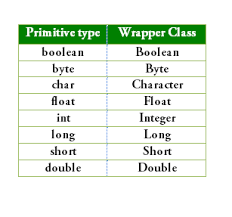
As we know that there are two types of data types in the Java i.e. Primitive and Non- Primitive.
As Java Collections don’t work with the Primitive Data Types . So the Wrapper class converts the Primitive data type into the Object.
It “wraps” a primitive value inside an object.
As we know that the data of normal primitive data type is saved in the Stack memory by the JVM and Object data is stored in the Heap memory. So here the memory allocation of the data is different for both the datasets.
Also all the data of the Stack memory is remained uptill the method run, as the method ends the Stack memory is cleaned. But in the case of the heap memory the data is stored permanently untill it goes into the garbage collection.
There are 2 Types of Boxing methods in Java:
AUTOBOXING
Autoboxing is the method in wrapper class which is automatically used to convert the Primitive data type into the Object.
int age=90;
INTEGER a= age;
INTEGER a= INTEGER.valueof(age);  // Internally this is executed
In the given example the value of age is been assigned to the wrapper class . So the value of a will be stored in the Memory of the Heap memory in java.
UNBOXING
The Unboxing is the method in Java which is used for converting the object into the primitive data type so basically it does is converts Object back to primitive type.
INTEGER age=18;
int num = age;
Also there is a method of manually converting the Objects into the primitive data types and Primitive data types into the objects
Integer obj = Integer.valueOf(10);int num = obj.intValue();String s = String.valueOf(25);int n = Integer.parseInt("25");Integer i = Integer.valueOf("25")
OPERATORS IN JAVA
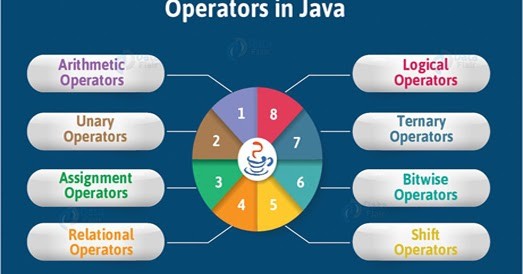
Operators in Java are basic building blocks .
They are basically used to perform various operations like addition, comparison, logical operations, etc.
These are the following operators:
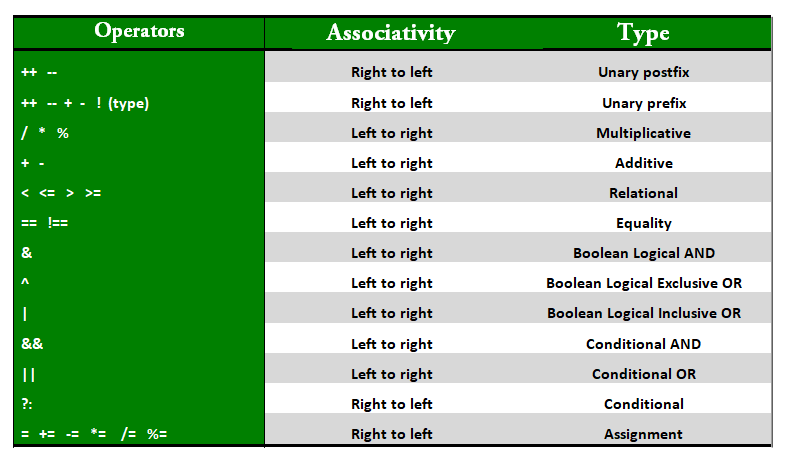
Mainly these operators are used in the the looping, if- else statement, etc.
IF ELSE STATEMENT
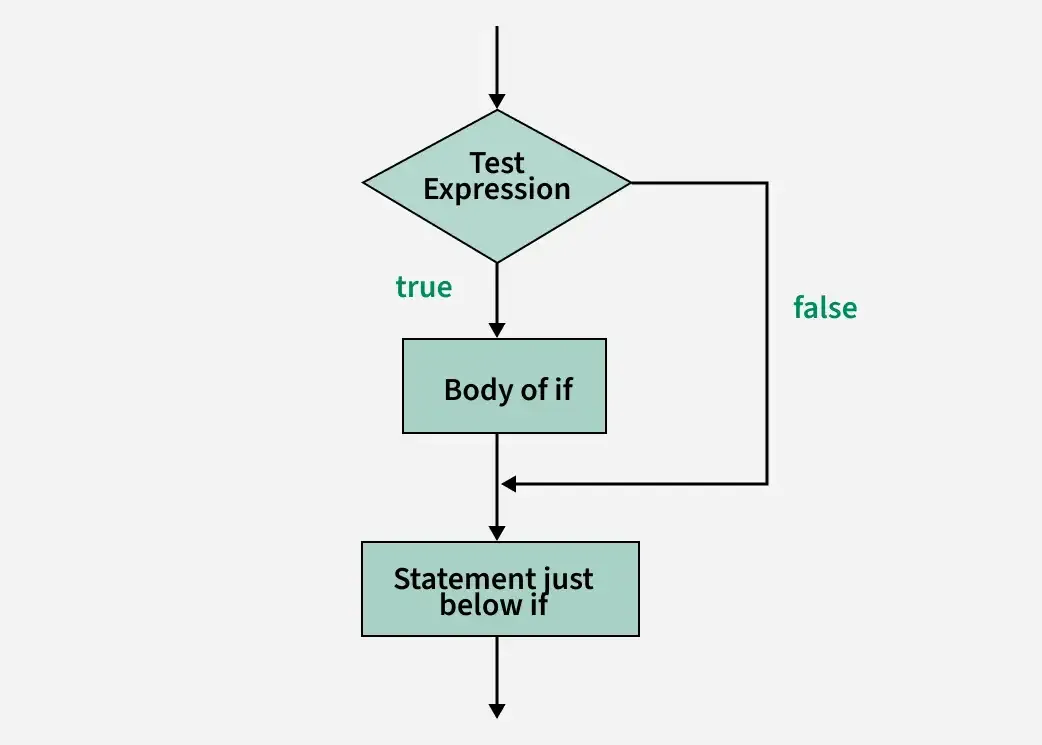
The IF-ELSE Statement in Java is used to execute a command in which the statement is execute if it follows the given condition and then the block of code is execute if not follows the given condition then the else condition is executed.
Syntax:
if(condition){
     //Statement
}

else{
     //statement
}
For Example:
public class Main {
    public static void main(String[] args) {
        int age = 18;

        if (age >= 18) {
            System.out.println("You are eligible to vote.");
        }
        else {
            System.out.println("You are not eligible to vote.");
        }
    }
}
TERTIARY STATEMENTS
IF-ELSE-IF STATEMENT:
It is the type of the Control statement in java which is used to execute a block of code with multiple statements together or else with executing different different block of code based on the following needs.
public class Main{
    public static void main(String args[]){
        int age;
        Scanner sc= new Scanner(System.in);
        age=sc.nextInt();

        if(age>=18){
            System.out.println("You can drive");
        }
        else if(age>=70){
            System.out.println("You have reached the age limit you can't drive");
        }
        else{
            System.out.println("You cant't drive");
        }
    }
}
SWITCH STATEMENT
Switch case Statements are used to execute a multi-way branch of code on the value of expression to be execute in the program.
Also It executes on the provided conditions as well it has a different block for the Default value in the expression and It can be used with many expressions.
Each case must be compulsorily end with the Break statement to prevent fall-through.
Syntax:
switch(parameter)
    case (condition):
          //expression
          break;
    case (condition):
          //expression
          break;
    //'  '   '
    default: //optional but useful
          //expression
          break;
Example:
int n=2;
switch(n){
    case 1:
        System.out.println("Monday");
    case 2:
        System.out.println("Tuesday");
    case 3:
        System.out.println("Wedneday");
    case 4:
        System.out.println("Thursday");
    case 5:
        System.out.println("Friday");
    default:
        System.out.println("Holiday");
}
PROJECT:
⚡Pune Electricity Bill Calculator Real Time
Conditions:
Bill Pay per unit
0-100 5
101-300 7
301 and above 10
import java.util.Scanner;

public class sam {
    public static void main(String args[]){
        int units,bill;
        Scanner sc= new Scanner(System.in);
        units=sc.nextInt();

        if(units<=100){
            bill = units*5;
            System.out.println("Your Electricity Bill is:"+bill);
        }
        else if(units>=100 && units<=300){
            bill=(500+((units-100)*7));
            System.out.println("Your Electricity bill is "+bill);
        }
        else{
            bill=1900+((units-300)*10);
            System.out.println("Your Electricity bill is "+bill);
        }
        String category = (bill <= 500) ? "Low" : (bill <= 2000) ? "Medium" : "High";

        System.out.println("Bill Category: " + category);
        sc.close();
    }
}