Java Basics Part 1
INTRODUCTION TO JAVA PROGRAMMING
Java is the high level , object-oriented and platform-independent programming language developed by the James Gosling and his team at Sun Microsystems in 1995. It is one of the most popular languages in the world, known for its portability, security and robustness.
The Java follows three steps of execution known as JDK,JVM and JRE. JVM stands for Java Virtual machine, JDK stands for Java Development kit and JRE stands for Java Runtime Environment.
Java follows the principle “Write Once, Run Anywhere “
Key Features of Java:
Java Supports Multi-threading i.e. Supports concurrent execution of multiple parts of a program.
Java is a robust programming language which is the best for the memory management and error handling.
Java is Platform Independent programming language which runs on JVM.
Java is OOPS language , everything is treated as an object, promoting reusability and modularity.
Java provides features like Exception handling ,security manager to protect data.
History of JAVA
What if I would tell you the development story behind the invention of Java was not for the Coding. You might get shocked. Yeah, Java was the language which was developed by James Gosling and his team for “Sun Microsystems” in the Year 1995.
Actually the Java was known as “Oak“ during that period and also its was developed for the Electronic Systems like TV, etc. types of things then the further timeline begin…
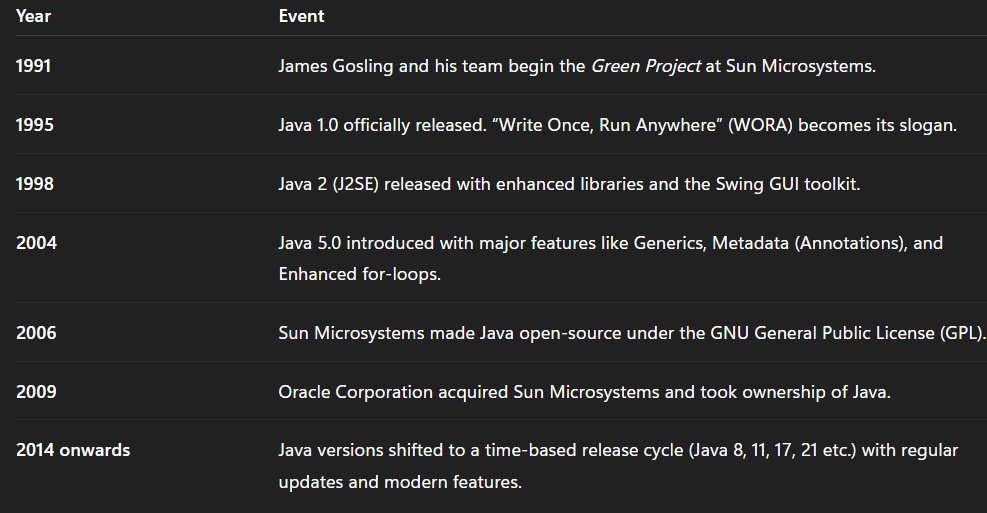
As now the Java has been developed their ecosystem such as they are used in big firms for Android App development , Web Development, Cloud Development and also for Enterprise level Development. Java has become more powerful language which also further goes with its ecosystems like Spring, JDBC , JSL, etc.
PROCESS OF EXECUTION
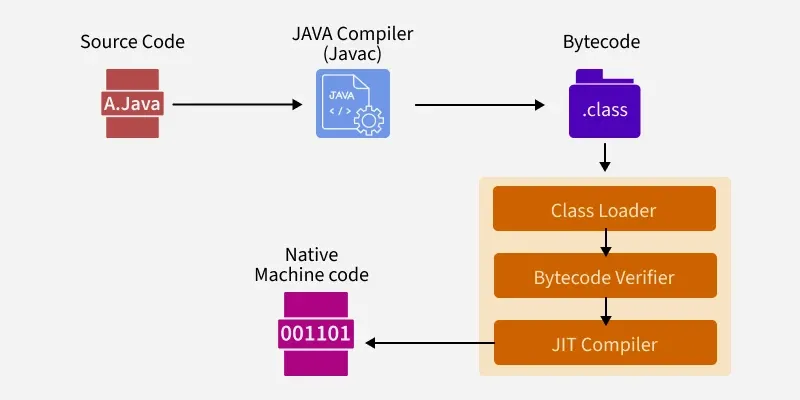
In Java there are 3 important terms
JVM
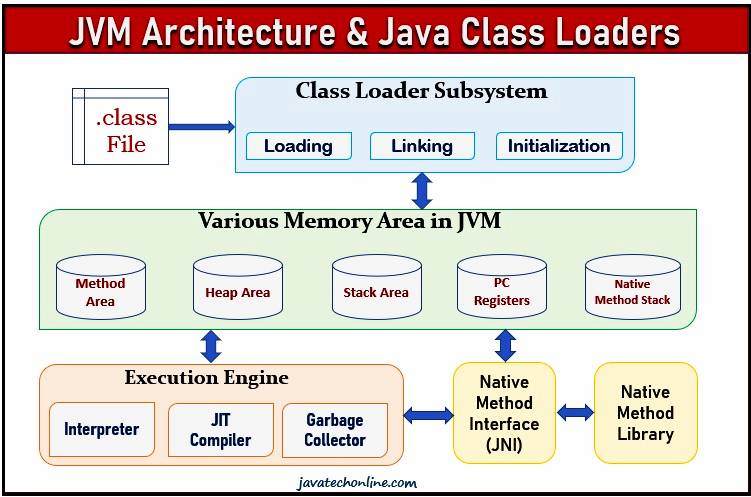
JVM is Java virtual machine in which the procedure of the code execution is started , the program is compiled in the JVM. Firstly a Class file for java is been made with .class and then loaded into the system. The Class loader system has 3 steps i.e. Loading, Linking and Initialization .Then the memory area in JVM occupied are Method Area, Heap Area, Stack Area, PC Registers and native method stack. Method area stores all class level data including static variables. Heap Area has all objects in it. Stack Area in Java is a part of RAM where method calls, local variables, and references are stored during the program’s execution. PC register stores the address of the executing program in its memory with certain instructions. Native method stack holds native method information(different language codes). The generated byte code is then executed by the execution engine. Interpreter interprets the code line by line. JIT compiler increases the efficiency of the interpreter as every new method executed needs new interpreter also the methods not needed is dumped into garbage collection. Native Java interface interacts with native method libraries for the execution.
JRE
JRE is Java Runtime Environment which is the Engine of the whole system in java through which the Loaded program is Run into the System.
It acts as a bridge between your Java code and the operating system, ensuring that your application runs smoothly on any platform that supports Java.
JDK
JDK is Java Development Kit which is used for the development of Java toolkit which used by Java Developers to develop , compile and run java programs, making it an essential part of the Java ecosystem.
It is used to run Java programs, the JDK allows you to write , compile and debug them.
The JDK is a software development kit that contains:
JRE (Java Runtime Environment) – to run Java programs
Compiler (javac) – to convert
.javasource code into .class bytecodeDebugger (jdb) – to find and fix errors in your Java programs
Other development tools – like
jar,javadoc,javap, andkeytool
In short:
JDK = JRE + Development Tools
DATATYPES IN JAVA
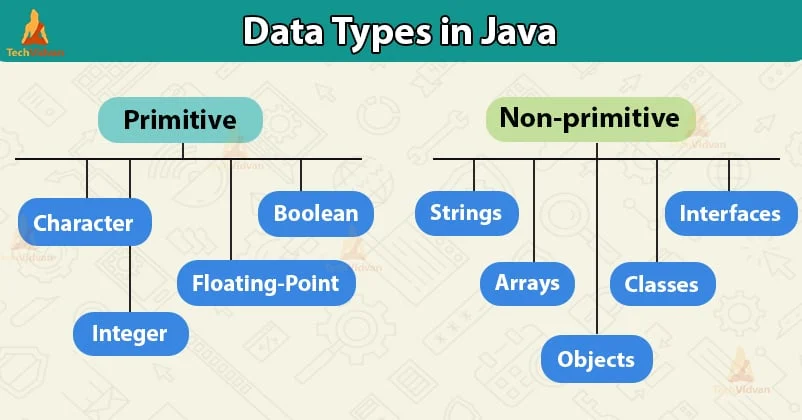
In Java Datatypes are the form in which the inputs and output based operations we need to execute in the given code. Java has two types of Data Types i.e. Primitive and Non-Primitive.
// Non Primitive DataTypes
public class Variableszz{
    public static void main(String args[]){
        int marks=90;
        String name="Prasad";
        float cgpa= 9.3;
        bool result= true;  //true for pass and false for fail

        System.out.println(marks);
        System.out.println(name);
        System.out.println(cgpa);
        System.out.println(result);


// FUn part: We can also take the datatypes in the form of machine language inside the variable Literals
        int num1= 0x7E;
        System.out.println(num1);
    }
}
The memory space the following non primitive data types takes are as follows:
INT= 4 bytes
LONG= 8 bytes
SHORT = 2 bytes
BYTE= 1 byte
CHAR= 2 bytes
FLOAT = 4 bytes
DOUBLE = 8 bytes
BOOLEAN = 1 byte
TYPE CONVERSION
Type Conversion is the type promotion method that happens automatically when a smaller datatype is converted into larger datatype.
In this , The the value of smaller data type can be assigned to the higher data type but the value of higher data type cannot be assigned to smaller data type.
byte a=296;
int b = a;
System.out.println(a);
TYPE CASTING
Type casting is the method in which we manually change the data type in the program.
It is mainly used while assigning the value of higher data type cannot be assigned to smaller data type.
float f= 99..99;
int t= (int) f;
System.out.println(t);
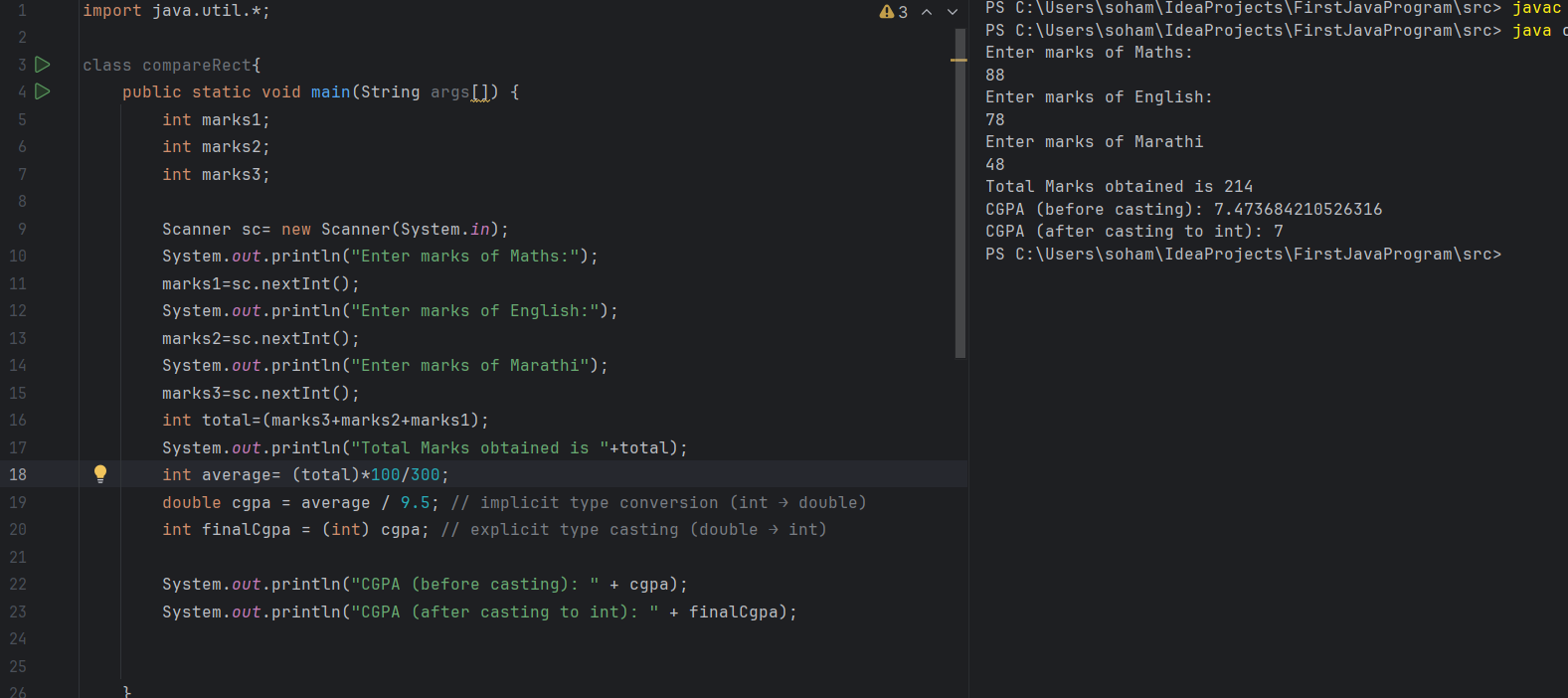
PROJECT: MARKS TO CGPA CONVERTER